1. Requirement Analysis
Two steps determine
- RBAC:
permissionstable: Only determine whether this role can perform basic operations, such as Viewers can Read, but can not Write. - ABAC:
policiestable: Determine whether the operation of this role is constrained, if it passes the RBAC judgment. For example, if this role is Viewer, then determine whether the knowledge base is public. If it is not, determine whether it is a departmental knowledge base. If it is, determine whether the user’s department is the same as the knowledge base department attribute, or whether it is used to handle dynamically changing attributes (IP, timestamp)
Role inheritance
- Advanced users automatically inherit all the permissions of junior users and can additionally acquire some other permissions
- Add a
parent_idcolumn in therolestable, sourced fromusers.id, to establish a hierarchical relationship among roles
Temporary Permissions
- The user is temporarily granted a
rolewith a validity period of only one month. - Add the
start_timeandend_timefields to theuser_rolestable.
Multi-team consideration
- If the algorithm platform serves multiple isolated teams
- It is necessary to maintain a
teamtable, and all core tables must include ateam_idcolumn. If users from TeamA and TeamB create the same entity (e.g., role, policy), the entity must have a clear ownership marker to ensure data isolation
User-Item Many-to-Many Relationship
- A
projectstable needs to be maintained, which is associated with theuserstable
Data analysis
- Establish a user behavior log table named
logsfor future design, which is associated withusers, serving as the foundation for user personas, tagging systems, and OLAP layered construction
2. Schema
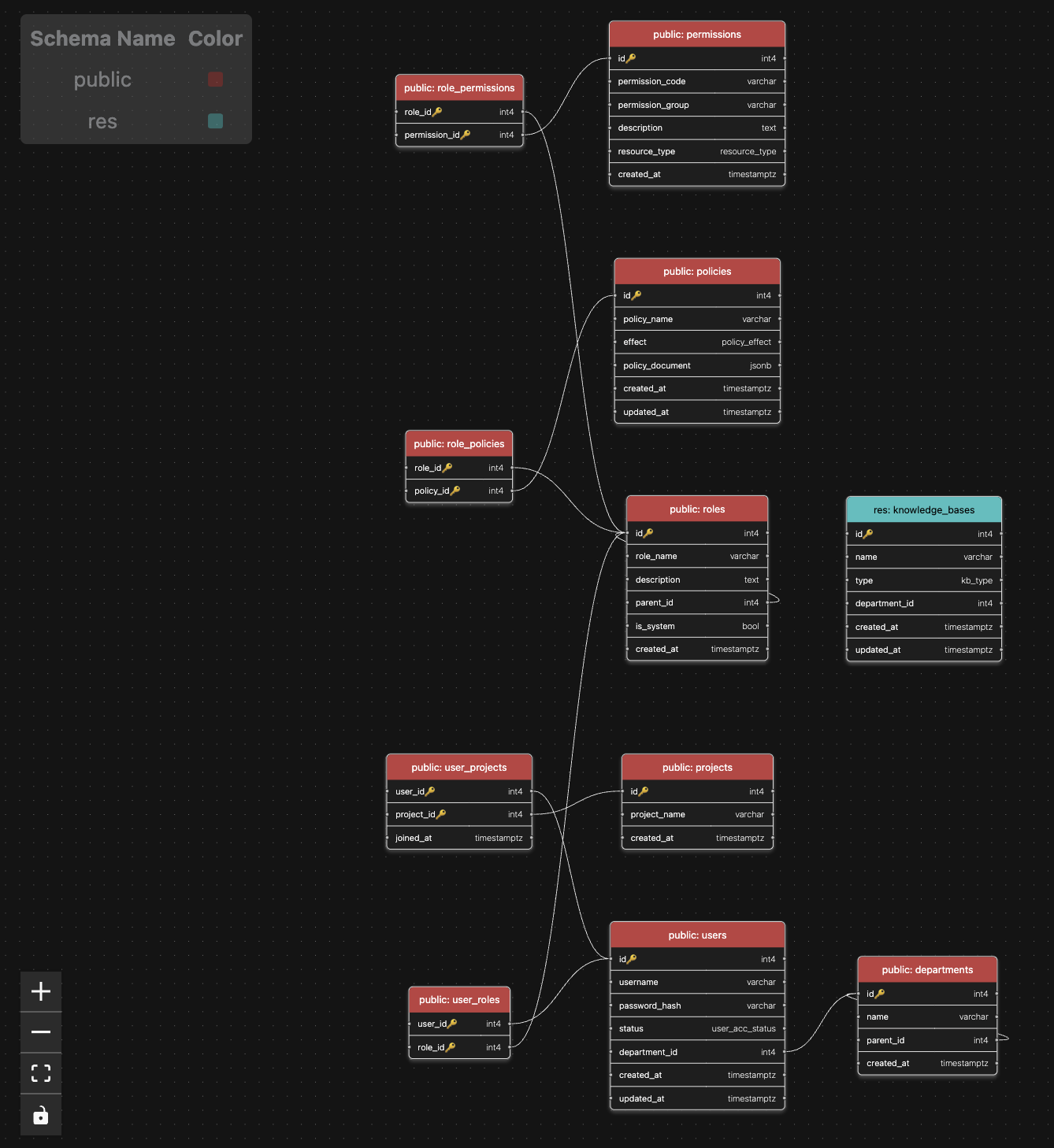
3. Process Example
Assuming the resource subject to access control is a knowledge base, which includes: a public knowledge base (accessible to everyone for read), and a departmental database (accessible only to personnel of the department for read, and only to certain roles for write)
After logging in, user rocky (role: editor; department: R&D Department) attempts to edit the R&D Department document in the department knowledge base. The application code first queries the roles table to find the associated roles (which may be multiple)
1 | SELECT role_id FROM user_roles WHERE user_id = 1; |
Starting from the direct role 101, recursively obtain all inherited roles through parent_id. Assume that 101 fully encompasses the permissions of 102
1 | -- Recursive function |
Query the permissions table and first find all static rules related to rocky
1 | SELECT p.permission_code |
It indicates that the basic read-write function of the knowledge base is available. At this point, the RBAC check has been passed, and the application code can return a user JSON, such as {user: 1, role: [101, 102], department: R&D Department, perm: [read, write] ... }
However, further judgment is needed to determine whether Rocky has write permission for the R&D department documents in one of the departmental knowledge bases. In this case, ABAC is introduced
Query the “policies” table using the code, and extract the “resources” JSON from “policy_document”, where {type: department, department: Development .. }It indicates that the documentrocky` intends to write is for the departmental knowledge base of the R&D department
1 | SELECT p.policy_document |
Among all the identified policies, compare the parsed resources json and user json. If user.attributes.department == 'Development' and "resource.type": "department", then the document can be edited
For the maintenance of the role_policies table, for the same role chain, it is generally only necessary to insert the (role, policy) pair for the lowest-level role, Viewer
To maintain the ‘role_permissions’ table, simply insert the newly added permissions at a higher level
1 | (3, 10), -- Viewer: read |