Abstract: This report aims to introduce a methodology for robustly extracting structured data from Excel, containing multi-layer headers by using pandas(Python) only. And in the end the weakness of this method will be shown.
1. Problem Description
Normally, an Excel table is composed by couples of header lines and data lines. For a multi-layer headers table, the header may looks like this:
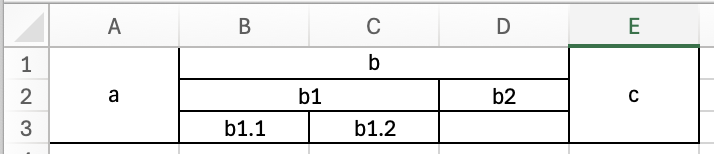
And in pandas’ view, it looks like that(N for nan):
1 | a b N N c |
The purpose is extracting headers from whole table.
2. Solution and Algorithm Design
Assuming 1:
We are able to find the start of the header. Maybe line 0 or maybe some filters can be used.
Assuming 2:
The values in first line of data block must be different to the last line of header block.
In each line, we are trying to find if next line is valid header. Let A, B to be current line and next line. And let S to be a statue of judging wether current value is a potential merge cell.
Firstly, find the right value of Ai, if Ai is not nan, Ai+1 is not nan, it means Ai absolutely is not a merge cell, like a in my example. Set s = False
If Ai is not nan and Ai+1 is nan, it means we can consider Ai as a potential merge cell, like b, b1, b2, b1.2. Set s = True.
Secondly, another judging should be done. If s = True, it means the value below it can be anything, like b1 != b, b1.1 != b1.
If s = False, if Bi is nan, it is valid for next line is table, like Ai = a; Bi = N.
If s = False, if Bi != nan and Ai != Bi, as Assuming 2, it means B is not header anymore. So we can say the last line of header is A.
Algorithm Implementation (Python)
1 | def is_valid(upper, lower): |
3. Deficiency
The biggest problem would be the situation like Ai = b1.2. In this circumstance, Ai would be recognised as a potential merge cell, but actually the Ai+1 = N is belongs to b2.